Skill Canvas GitHub Install

Sketch the workflow. Get real agents and skills.

Skill Canvas is a free VS Code extension. Draw how the work should flow, answer a few plain questions for each step, and it writes the agent and skill files that Claude Code and GitHub Copilot run. No YAML, no folder rules to learn.

Or from a terminal: code --install-extension alaturqua.skill-canvas

yes no, retry …and prints these files
1InputBug report
2AgentFix & test
3IfTests pass?
4OutputPull request
Agentfix-test.claude/agents/fix-test.md
---
name: fix-test
description: Fixes a reported bug and runs the tests. Use for bug reports.
tools: Read, Edit, Bash
skills:
  - write-pr-notes
---

You fix bugs.

1. Reproduce the bug.
2. Fix it with the smallest change.
3. Run the tests.
Workflowloop-example.claude/skills/loop-example/SKILL.md
---
name: loop-example
description: Fix a reported bug, retrying up to three times until the tests pass.
---

# loop-example

Fix a reported bug, retrying up to three times until the tests pass.

Follow these steps. "Go to step N" means continue from that step.

1. **Start: Bug report.** The user provides: A bug report with steps to reproduce. Then go to step 2.
2. **Loop: Up to 3 tries.** Repeat up to 3 times, counting iterations. Each iteration, go to step 3; a step that leads back here starts the next iteration. When the loop ends, go to step 6.
3. **Fix & test.** Delegate to the `fix-test` subagent. Then go to step 4.
4. **Decide: Tests pass?** Check: All tests pass. If yes, go to step 5. If no, go to step 2.
5. **Finish: Pull request.** Deliver: A pull request with a short summary. Stop here.
6. **Finish: Escalate.** Deliver: What was tried and why it failed. Stop here.

A workflow sketched with sticky notes: bug report, then an agent that fixes and tests, then a check whether the tests pass, which leads to a pull request or back to try again. Beside it, the agent file and the workflow skill file that Skill Canvas writes from it.

Try it on the board

This is the real editor, running in your browser. Drag a block in, connect it, press Arrange. Select a block to fill it in on the right, and its Claude Code and Copilot files reprint below. Nothing leaves this page.

Export here only shows what it would save. The extension writes the files.

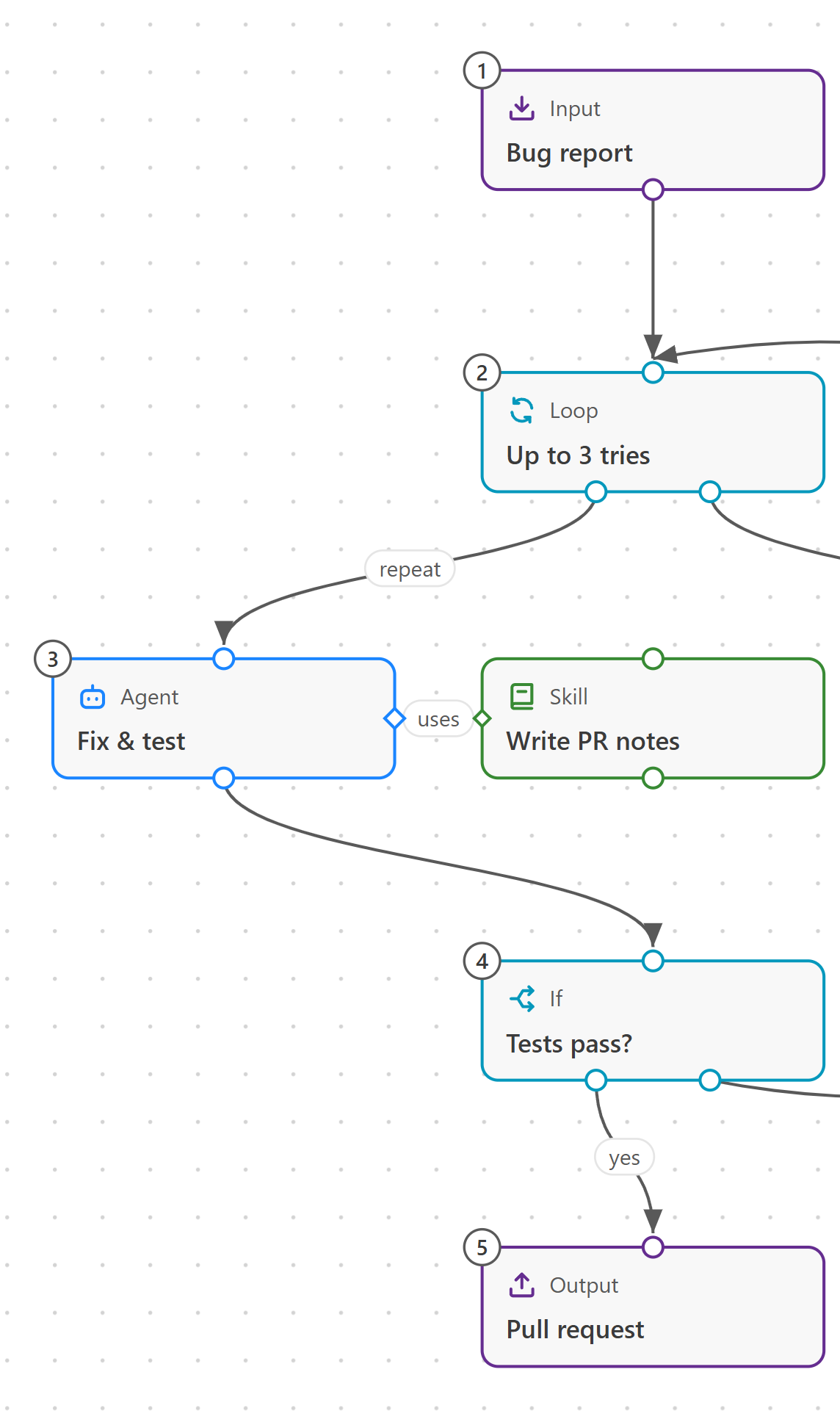
Part of the Skill Canvas board, arranged top to bottom: Bug report, Up to 3 tries, the Fix & test agent using the Write PR notes skill, Tests pass?, then Pull request.
Part of the same board, arranged top to bottom. The live board needs a wider screen. Open it anyway

Claude Code edition

Agentfix-test.claude/agents/fix-test.md
---
name: fix-test
description: Fixes a reported bug and runs the tests. Use for bug reports.
tools: Read, Edit, Bash
skills:
  - write-pr-notes
---

You fix bugs.

1. Reproduce the bug.
2. Fix it with the smallest change.
3. Run the tests.

GitHub Copilot edition

Agentfix-test.github/agents/fix-test.agent.md
---
name: fix-test
description: Fixes a reported bug and runs the tests. Use for bug reports.
tools:
  - Read
  - Edit
  - Bash
---

You fix bugs.

1. Reproduce the bug.
2. Fix it with the smallest change.
3. Run the tests.

When it helps, use these skills: `write-pr-notes`.

From sketch to a running workflow

Five steps, all inside VS Code.

  1. Sketch

    Drag blocks onto the board: Input, Agent, Skill, Tool, If, Loop and Output. Or start from a ready-made starter.

  2. Fill in

    Each block asks plain questions: what it's for, its instructions, which tools it may use. The preview shows the file it becomes.

  3. Connect

    Arrows set the order. A dotted uses link gives an agent a skill or tool. If and Loop handle yes, no and retries. Arrange tidies it all left to right or top to bottom.

  4. Export

    Save to this project or to all your projects. Skill Canvas lists every file before writing, and updates the ones it wrote last time.

  5. Run

    Type the workflow's command, like /loop-example, in Claude Code or GitHub Copilot Chat.

Already have agents and skills?

Import brings them onto the board from .claude or .github in your project, or from your user folder. Skills an agent preloads arrive already linked. Edit them on the board, export, and the same files update in place.

Where the files go

Standard locations, so the tools find them without Skill Canvas installed.

Export locations for each tool
ForAgentsSkills and workflows
Claude Code, this project.claude/agents/<name>.md.claude/skills/<name>/SKILL.md
Claude Code, all projects~/.claude/agents/<name>.md~/.claude/skills/<name>/SKILL.md
GitHub Copilot, this project.github/agents/<name>.agent.md.github/skills/<name>/SKILL.md
GitHub Copilot, all projects~/.copilot/agents/<name>.agent.md~/.copilot/skills/<name>/SKILL.md

Put your process on the board.

Free and open source under the Apache License 2.0.

Install in VS Code View on the Marketplace

Or from a terminal: code --install-extension alaturqua.skill-canvas

In VS Code, Export saves these files

Install in VS Code